
Digital satellite is a tool that helps connect people to the world when things get tough. Let’s take for instance, some tourist went for a walk in the woods nearby and couldn’t find their way out. They tried to use their phones to either text someone for help or use map to find their way out. But suddenly realized there’s no network signal.
However, with the help of digital satellite, you can reach out to anyone in time of emergency. This days, people with super smart devices rarely get stranded or get stuck somewhere without a way out. One of these smart devices is for iPhone users. Although, not available in all iPhones.
With iPhone Satellite tools, your phone can instantly connect to a network once there’s no internet signal. Users can send and receive messages even without signal or Wi-Fi.
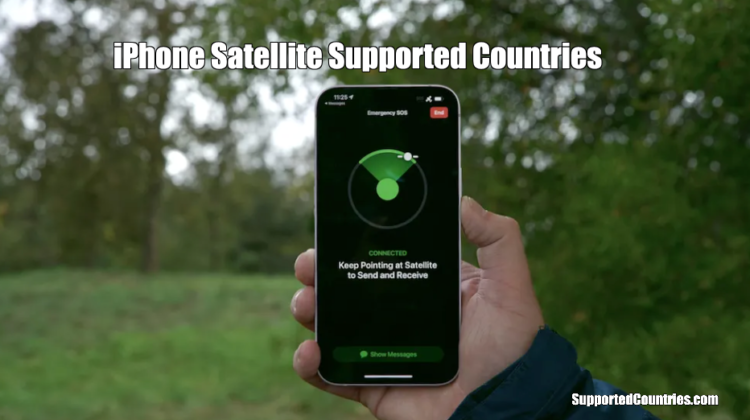
For it to successfully connect to the satellite, you must position your mobile to face the satellite signal. You can locate the signal through the guide on your phone screen, pointing towards the satellite’s direction.
However, the satellite network isn’t the same as the normal data network. It can be slow and often takes a while to get to the recipients destination. It’s because the network has to travel through space before reaching to the receiver.
iPhone Satellite is built by Apple for users safety in times of network failure.
iPhone Satellite can be used for sending emergency text messages. You can also use it to upgrade your map location. That way, you can be easily found if you’re lost.
In case your car breaks down in a remote area, use the iPhone Satellite to send your location to emergency services. The emergency service will notify someone where you’re stuck. That way, you can get a roadside assistance like a tow truck to assist you.
To use iPhone Satellite, you’ll need an iPhone 14 or newer version. Furthermore, to get a signal quickly, you’ll need an open sky.
You can only use iPhone Satellite for two years without any fee. However, service fee may apply, but it has not being specified yet.
In addition, not all iPhone 14 users can access this service. It’s only for iPhone 14 users who’re in iPhone Satellite supported countries.
What is iPhone Satellite?
iPhone Satellite is a unique tool for sending messages when there’s no network connection.
iPhone Satellite works with the satellites in space for sending and receiving message when there’s no mobile signal. However, videos or pictures can’t be sent through the satellite, only text. Making phone calls isn’t supported either.
How iPhone Satellite Works
- iPhone Satellite instantly switches one once there’s no internet connection. Its connectivity usually appears on your phone screen.
- It’s like a compass with arrows, showing you the direction of the satellite. With this, you can be able to locate the signal.
- iPhone Satellite doesn’t work in a hidden location or under a thick vegetation. You’ll need a clear view to get the satellite signal.
- Once your phone is connected to the satellite, use it to send a short message. You can also share your location if necessary.
- As soon as you’ve sent the message, wait for a while. Don’t be in a haste to get feedback immediately because it’s not like the normal data message we often use. It will take few minutes depending on how clear the sky is, before getting to the destination.
- The emergency distress signal (SOS) will help you send your message across or get you a help when you’re lost.
- Additionally, if you have iOS, an Apple’s iPhone software, you can still use it to send text messages to people in certain locations or countries.
Supported iPhones
- iPhone 14, iPhone 14 Plus, iPhone 14 Pro, iPhone 14 Pro Max
- iPhone 15 series with improved satellite features
List of iPhone Satellite Supported Countries:
iPhone Satellite available countries are:
- Australia
- Austria
- Belgium
- Canada
- France
- Germany
- Ireland
- Italy
- Japan
- Luxembourg
- Mexico
- Netherlands
- New Zealand
- Portugal
- Spain
- Switzerland
- United Kingdom
- United States
Furthermore, some countries can use the Emergency SOS through satellite. While some may have limited reach, depending on the satellite coverage.
Users in the United States, Canada and Japan can use the iPhone 14 satellite to send text to people. While individuals in Mexico can use iOS 18.4 or the newer version to send text.
iPhone 14 users can get roadside help through satellite. They just need to be in the U.S., UK, or Australia to access this service.
Furthermore, where you buy your phones matters. iPhones from Armenia, Belarus, China, Kazakhstan, Kyrgyzstan, or Russia can’t use satellite.
In case your iPhone is from Hong Kong or Macao, you need an iPhone 16e or latest version to use satellite features.
List of States Where iPhone Satellite is Supported in the USA
United States of America is among the iPhone Satellite supported countries.
iPhone 14 users in Puerto Rico, the U.S. Virgin Islands and all the states in the U.S. can use iPhone Satellite.
iPhone 14 users in Guam and American Samoa can’t access this service.
However, the general accessibility of iPhone Satellite depends totally on the environmental features. Mountains, deserts including the ocean determines the impact of your connectivity.
A clearer view, free from any obstruction like tall buildings or foliage blockage is needed for a strong satellite connection.
iPhone 14 or 15 users with iOS 18 can use satellite features.
iPhone Satellite Alternatives:
There are some devices or platforms that offer satellite connectivity. They are:
- ZOLEO Satellite Communicator: It can be used for sharing location and sending text messages.
- Garmin inReach: It can be used for sending distress messages, sending text and sharing locations.
- Thuraya SatSleeve: It’s also for iPhone users. It can be used to make calls, send emails and texts.
- Iridium GO!: It can be used for sending voice messages, text and also acts as data connectivity (Hotspot).
Other Alternatives
- T-Mobile’s T-Satellite
- Verizon’s Satellite Messaging
- AST SpaceMobile
Conclusion
iPhone Satellite is an iPhone 14 model software used for sending short texts and emergency alerts during critical situations. It only works in iPhone Satellite supported countries.
It automatically works in locations where there’s no network connectivity.
For it to function properly, you must use it in open areas, free from any obstruction. Note that it can’t work in an enclosed areas.
Furthermore, you must point towards the direction of the satellite through the compass indication on your phone screen.
In addition, Apple’s satellite works in some countries, but not everywhere. While other satellite devices like Garmin work almost in many countries.
With time, satellite connectivity will become common in latest smartphones.